
A static poster can look attractive, but adding controlled movement can make it much more engaging for social media, advertising, movies, gaming, products, and events. With Kling AI Motion Poster creation, you can transform a still image into a short animated video by using Kling AI’s Image-to-Video capabilities.
Kling’s official Image-to-Video workflow lets you upload an image and describe the movement you want. The current official guide explains a simple Subject + Movement approach and supports 5-second and 10-second generation, with 16:9, 9:16, and 1:1 aspect ratios documented in the guide.
In this guide, you’ll learn what a motion poster is, how to create one with Kling AI, how to write effective prompts, how to add cinematic movement, and how to avoid common problems.
What Is a Kling AI Motion Poster?
A Kling AI Motion Poster is a static poster, photograph, illustration, or promotional graphic turned into a short animated video using AI.
For example, imagine a movie poster showing a hero standing in a dark city during heavy rain. Instead of keeping the poster completely static, you can make the rain fall, add subtle movement to the character’s clothes, create drifting smoke, and slowly move the camera toward the hero.
The purpose is not necessarily to create a complete action scene. A good motion poster often uses small and controlled movements while keeping the original composition recognizable.
This makes motion posters useful for:
- Movie promotions
- Gaming campaigns
- Product advertisements
- Music promotions
- Event announcements
- Instagram Reels
- YouTube Shorts
- Facebook advertising
- Digital marketing campaigns
Third-party motion-poster guides also explore effects such as subtle movement, parallax, lighting changes, and camera motion for turning static designs into animated visuals.
How Does Kling AI Turn a Poster Into Video?
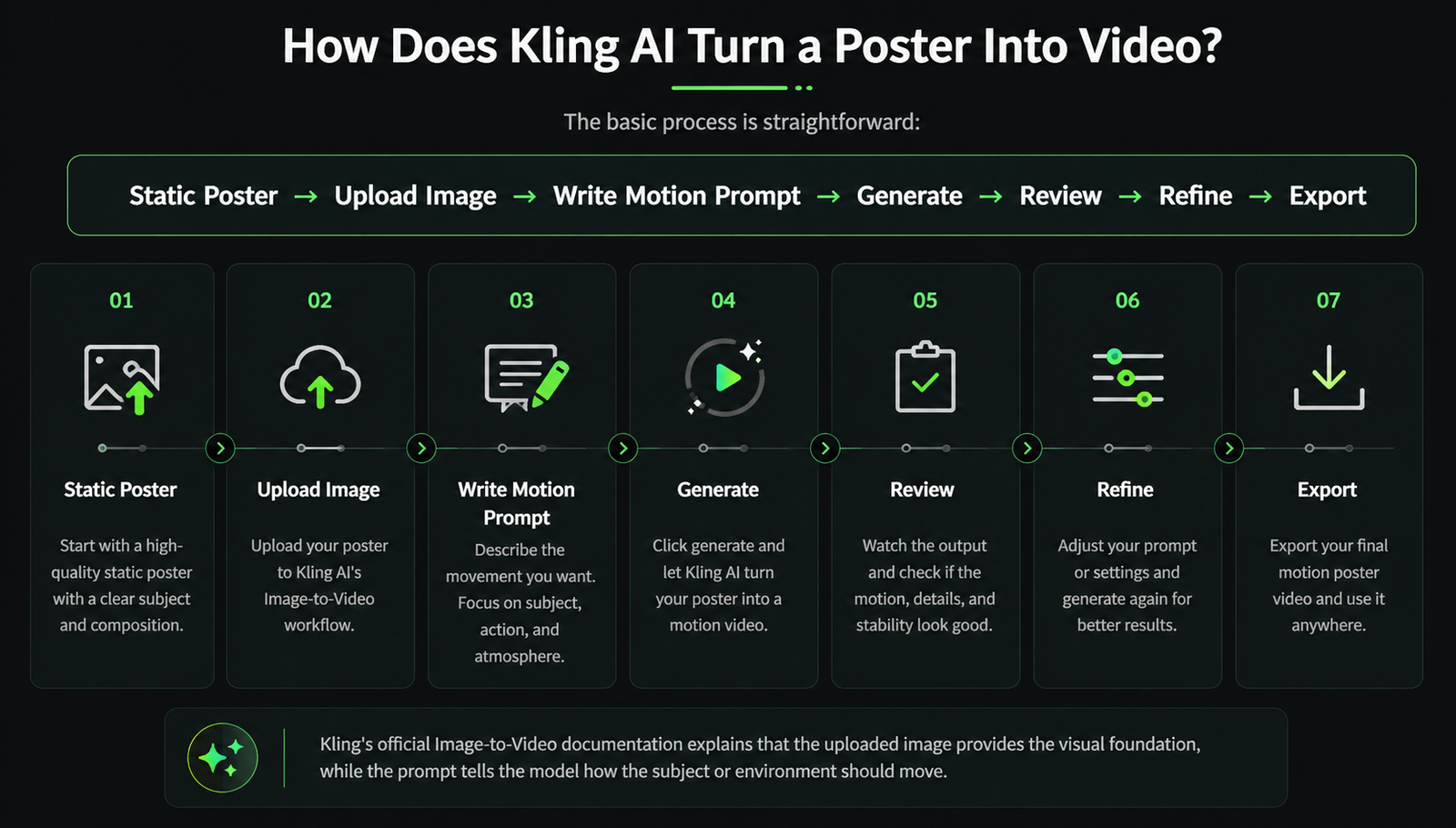
The basic process is straightforward:
Static Poster → Upload Image → Write Motion Prompt → Generate → Review → Refine → Export
Kling’s official Image-to-Video documentation explains that the uploaded image provides the visual foundation, while the prompt tells the model how the subject or environment should move. Kling specifically recommends focusing on the subject and movement and keeping movement descriptions physically plausible.
Kling’s current Image-to-Video product page follows a similar workflow: upload an image, describe the desired motion, generate the video, and export the result. It also highlights start and end frames for more controlled transitions in supported workflows.
This means you don’t necessarily need to animate every element manually.
How to Create a Kling AI Motion Poster
1. Choose a High-Quality Poster
Start with a good-quality image. Your source poster should have a clear subject and a reasonably clean composition.
For example, if you are creating a movie poster, make sure the character’s face and body are clearly visible. If you are creating a product poster, the product should be sharp and easy to recognize.
A poor-quality source image can make animation more difficult because existing distortions may become more noticeable after generation.
2. Upload Your Image
Open Kling AI’s Image-to-Video workflow and upload your poster.
Once the image is uploaded, don’t immediately add a complicated prompt. First decide what you want to move.
You might want:
- The character to move
- Hair or clothing to move
- Rain or smoke to move
- The camera to zoom
- Light to change
- Background particles to move
Choosing one main movement first can make the generation easier to control.
3. Write Your Motion Prompt
Your prompt tells Kling what should happen inside the image.
For example, a weak prompt would be:
Make this poster cinematic.
This doesn’t explain what should actually move.
A more useful prompt would be:
The character slowly turns toward the camera while his coat moves gently in the wind. Soft fog drifts through the background as the camera slowly pushes forward.
Kling’s official guide recommends simple words and sentence structures and notes that movement should generally make physical sense within the source image.
Best Prompt Formula for Kling AI Motion Posters
A useful formula for creating a Kling AI Motion Poster is:
Subject + Primary Movement + Background Movement + Camera + Lighting
For example:
A futuristic warrior slowly raises his head and looks toward the camera. His cape moves gently in the wind while smoke particles drift behind him. The camera slowly pushes forward with dramatic cinematic lighting and smooth natural motion.
The subject identifies the main focus. The primary movement explains the action. Background movement adds atmosphere, while camera and lighting instructions help establish the visual style.
Kling’s broader prompt guide similarly describes subject, movement, scene, camera language, and lighting as important elements for effective video prompts.
Use Subtle Motion Instead of Too Much Movement
One of the biggest mistakes beginners make is asking the AI to animate everything.
A poster is already a carefully designed composition. If the character runs, the camera rotates, the background changes, the lighting flashes, and particles fly everywhere at the same time, the original design can become unstable.
For many posters, subtle motion looks more professional.
For example:
The character remains mostly still while his hair moves gently in the wind, rain falls in the foreground, fog drifts behind him, and the camera slowly pushes in.
This gives the poster a feeling of movement while preserving its identity.
A third-party Kling motion-poster guide also recommends controlled movement and limited camera transformations to help maintain visual stability.
Add Cinematic Camera Movement
Camera movement can make a major difference to a motion poster.
Instead of simply animating the subject, you can instruct the camera to move.
Common camera movements include:
Slow push-in: The camera gradually moves closer.
Pull-out: The camera slowly moves away.
Pan: The camera moves horizontally.
Tilt: The camera moves vertically.
Tracking: The camera follows the subject.
For example:
The character remains centered while the camera slowly pushes toward him.
This is more useful than simply writing:
Add cinematic movement.
Kling’s current documentation includes camera movement among its video-generation capabilities and guides.
Add Parallax and Background Effects
Parallax can make a flat poster feel more three-dimensional.
Imagine a poster with particles in the foreground, a character in the middle, and a city in the background. Slightly different movement between these layers can create a sense of depth.
You can also add:
- Rain
- Fog
- Smoke
- Dust
- Clouds
- Fire
- Floating particles
- Light rays
For example:
Small particles move gently in the foreground while the character remains stable and distant fog slowly drifts across the background.
The key is moderation. One or two well-controlled effects can often look better than ten effects competing for attention.
Best Kling AI Motion Poster Prompts
Cinematic Movie Poster Prompt
The main character slowly looks toward the camera while his jacket moves naturally in the wind. Thin fog drifts through the background and small particles float in the air. The camera slowly pushes in with dramatic cinematic lighting and smooth motion.
Gaming Poster Prompt
The warrior remains centered while glowing energy particles move around him. Smoke drifts behind the character and his clothing moves slightly in the wind. The camera slowly pushes forward with dramatic lighting and a cinematic atmosphere.
Product Poster Prompt
The product remains centered and rotates slightly while a soft light sweeps across its surface. Fine particles move subtly in the background as the camera slowly pushes closer. Premium studio lighting, clean composition, and smooth controlled motion.
Horror Poster Prompt
The character remains still while dense fog slowly moves across the scene. A dim light flickers in the background as the camera slowly pushes toward the subject. Dark cinematic atmosphere and stable facial features.
Fashion Poster Prompt
The model gently turns toward the camera while her hair and clothing move naturally in a soft breeze. The camera slowly tracks forward with elegant lighting, shallow depth of field, and smooth cinematic motion.
Common Kling AI Motion Poster Problems
AI video generation doesn’t always produce a perfect result on the first attempt.
One common problem is too much movement. If multiple subjects and environmental elements are moving simultaneously, the output can become unstable.
Another problem is face or body distortion. Try reducing the amount of movement and use simple, realistic actions.
Text and logos can also be difficult. If your poster contains important branding, consider generating the animation first and adding the final text or logo during post-production.
This approach can be especially useful for advertisements and branded content because the final typography can remain under your control.
If the first result isn’t good, don’t automatically make the prompt longer. Instead, simplify it and focus on one primary action.
Kling AI Motion Control for Advanced Animation
For simple poster animation, Image-to-Video is a good starting point. However, creators who need more precise character movement can use Kling Motion Control.
Kling’s current Motion Control documentation says that creators can provide a character image and a reference action video, allowing the system to reproduce movement and facial expressions. Kling VIDEO 3.0 Motion Control also focuses on improved facial consistency during complex, multi-angle movements.
The difference can be explained simply:
Image-to-Video:
Describe the movement you want.
Motion Control:
Provide reference movement to guide the character.
For example, if you have a dancer in a poster and want a specific dance movement, a reference video can provide more precise control.
Kling recommends matching the character’s proportions between the image and motion reference and using clear, continuous reference footage for better results.
Best Aspect Ratio for a Motion Poster
Choose the aspect ratio based on where you plan to publish the video.
9:16
Best suited to vertical short-form content such as Instagram Reels and YouTube Shorts.
16:9
Useful for YouTube videos, websites, and landscape promotional content.
1:1
Useful for square social media graphics.
Kling’s official Image-to-Video guide documents 16:9, 9:16, and 1:1 formats.
Third-party Kling integrations may offer additional formats or editing options, so always check the specific interface you’re using. For example, Kapwing’s current Kling integration advertises multiple aspect ratios and lets users continue editing generated clips with text, subtitles, audio, and other elements.
Kling AI Motion Poster for Marketing
A Kling AI Motion Poster can be useful for digital marketing because a static promotional image can be converted into a more dynamic short-form asset.
For example, an e-commerce brand could animate a product photograph with a subtle camera push and light sweep. A gaming company could animate character artwork with smoke and energy effects. A music artist could turn cover artwork into a short promotional video.
Marketers can then use these videos for social media, advertisements, landing pages, promotional campaigns, and content marketing.
Kapwing’s current Kling workflow also positions controlled motion and camera movement for commercial, product, music, and film-related applications.
Tips for Creating Better Motion Posters
To get better results, focus on the quality of your starting image first. A strong poster gives the AI a better visual foundation.
Next, choose one main movement. Don’t try to animate every element at once.
Use clear prompts such as:
“The character slowly turns toward the camera.”
instead of vague instructions such as:
“Make it amazing.”
Add supporting movement only when it helps the scene. Fog, rain, particles, lighting, and camera movement can improve the visual, but they shouldn’t overwhelm the original design.
Finally, generate multiple variations. If one version has distorted movement, change the prompt rather than simply accepting the first result.
Kling’s official guidance specifically recommends simple language, physically plausible motion, and descriptions that fit the source image.
Conclusion
A Kling AI Motion Poster is a simple and creative way to transform static artwork into engaging animated content. Instead of manually animating every element, you can provide an image and describe how you want the scene to move.
The best results usually come from controlled animation. Start with a high-quality poster, choose one primary movement, write a clear prompt, and then add subtle camera or environmental effects.
For simple projects, Kling’s Image-to-Video workflow provides a practical starting point. For more advanced character animation, Motion Control can provide additional control through reference movement.
Whether you’re creating a movie poster, gaming graphic, product advertisement, music promotion, or social media campaign, AI-powered motion posters can turn static designs into more engaging visual content.
FAQs
What is a Kling AI Motion Poster?
It is a static image or poster transformed into a short animated video using Kling AI’s video-generation capabilities.
How do I create a motion poster with Kling AI?
Upload your poster to Kling’s Image-to-Video workflow, describe the desired movement, generate the video, review the result, and refine your prompt if necessary.
Can Kling AI animate a static poster?
Yes. Kling’s Image-to-Video workflow is designed to transform uploaded images into moving videos.
What is the best prompt for a Kling AI Motion Poster?
A good prompt should describe the subject, its main movement, optional background movement, camera movement, and lighting or atmosphere.
Can I create product motion posters with Kling AI?
Yes. Product images can be animated with movements such as subtle rotation, camera pushes, lighting changes, and environmental effects.
Which aspect ratio is best for Instagram?
For vertical Instagram content such as Reels, 9:16 is generally the most appropriate format. Kling’s official Image-to-Video guide supports 9:16 along with 16:9 and 1:1.
Why does my Kling motion poster look distorted?
Excessive movement, unrealistic actions, complicated prompts, or a poor source image can contribute to unstable results. Try simplifying the prompt and using physically realistic movement.
What is Kling Motion Control?
Motion Control uses a character image and reference movement to provide more precise control over character actions and facial expressions.
Can I use Kling AI motion posters for advertisements?
Yes. Motion posters can be used for product promotions, social media campaigns, advertisements, events, gaming content, and other marketing applications.
How can I make my motion poster look cinematic?
Use a high-quality source image, subtle subject movement, a controlled camera push or pan, atmospheric effects such as fog or particles, and consistent lighting. Avoid adding too many movements at once.
If you’re interested in discovering the latest AI tools, following experienced educators like Manjeet Madhukar’s can be a great place to start. Their practical tutorials can help you understand different AI tools, explore their features, and learn how to use them effectively in real-world projects.