
Becoming a full stack developer requires more than learning a few programming languages. You need to understand how the frontend, backend, databases, APIs, security, deployment, and modern development tools work together. A clear full stack developer roadmap helps beginners learn these skills in the right order without getting overwhelmed by hundreds of technologies.
In 2026, the learning path has also expanded beyond traditional MERN or Java stacks. Developers are increasingly expected to understand cloud deployment, testing, DevOps practices, and AI-assisted application development. Current roadmap resources from roadmap.sh, GeeksforGeeks, Internshala, and other 2026 guides follow this broader approach.
This guide explains a practical full stack developer roadmap from beginner fundamentals to job-ready development.
What Is a Full Stack Developer?
A full stack developer works on both the frontend and backend of a web application. The frontend is responsible for what users see and interact with, while the backend manages business logic, APIs, databases, authentication, and server-side operations.
A developer may also handle deployment, performance, security, and basic infrastructure. roadmap.sh defines the role as working across both front-end and back-end development and often handling the work required to push an application into production.
A typical application works like this:
User → Frontend → API → Backend → Database → Backend → API → Frontend
Understanding this complete flow is the foundation of full stack web development.
Full Stack Developer Roadmap: Step-by-Step
1. Learn How the Web Works
Before learning frameworks, understand the basic architecture of the web.
Learn:
- Internet and web basics
- Client and server
- Browser
- HTTP and HTTPS
- DNS
- Domain names
- Web hosting
- APIs
- JSON
- Cookies and sessions
- Request and response cycle
You don’t need advanced networking knowledge at this stage. The goal is to understand what happens when someone enters a website address and interacts with an application.
2. Learn HTML
HTML provides the structure of a webpage and is the first technical skill in most full stack learning paths. GeeksforGeeks also places HTML at the beginning of its frontend roadmap.
Learn:
- HTML5
- Elements and attributes
- Headings and paragraphs
- Links and images
- Lists
- Tables
- Forms
- Input fields
- Buttons
- Semantic HTML
- Accessibility
- Basic SEO
Practice project
Create a personal portfolio website using only HTML and basic CSS.
Don’t move forward simply because you have watched an HTML course. You should be able to create a basic multi-page website yourself.
3. Learn CSS
CSS controls the appearance, layout, and responsiveness of websites.
Focus on:
- Selectors
- Box model
- Colors
- Typography
- Margin and padding
- Positioning
- Flexbox
- CSS Grid
- Media queries
- Responsive design
- CSS variables
- Transitions
- Animations
After understanding CSS fundamentals, you can learn a styling framework such as Tailwind CSS.
The important rule is simple: understand CSS before depending on a CSS framework.
4. Master JavaScript
JavaScript is one of the most important skills in a JavaScript-based full stack developer roadmap because it can be used on both the frontend and backend.
Start with:
- Variables
- Data types
- Operators
- Conditions
- Loops
- Functions
- Arrays
- Objects
Then learn:
- DOM manipulation
- Events
- Forms
- Fetch API
- JSON
- Promises
- Async/await
- Modules
- Error handling
- Local storage
Once comfortable, study advanced concepts such as:
- Closures
- Scope
- Hoisting
- Prototypes
- Event loop
- Call stack
- this
- Memory management
Projects
Build small applications such as:
- Calculator
- To-do application
- Weather application
- Quiz application
- Expense tracker
These projects help turn JavaScript knowledge into practical development skills.
5. Learn Git and GitHub
Version control is an essential part of professional development.
Learn:
- Git repositories
- Commits
- Branches
- Merging
- Pull requests
- Cloning
- Push and pull
- Merge conflicts
- .gitignore
Use GitHub to publish your projects and maintain your development history.
Your GitHub profile can eventually become part of your technical portfolio, so start using it while learning rather than waiting until you are job-ready.
6. Learn TypeScript
After becoming comfortable with JavaScript, add TypeScript to your full stack web development roadmap.
TypeScript adds static typing to JavaScript and can make large applications easier to maintain.
Learn:
- Types
- Interfaces
- Type aliases
- Union types
- Generics
- Type inference
- Type narrowing
- Utility types
- Functions
- Classes
- tsconfig
You don’t need to replace your JavaScript knowledge with TypeScript. Instead, learn TypeScript as an extension of your JavaScript skills.
7. Learn Frontend Development With React
Once your JavaScript fundamentals are strong, choose a frontend framework or library.
React is one of the most commonly recommended options, while Angular and Vue are also valid alternatives. GeeksforGeeks currently covers React, Angular, Vue and Next.js within its frontend roadmap.
For React, learn:
- JSX
- Components
- Props
- State
- Hooks
- Forms
- Events
- Conditional rendering
- Lists
- Context
- Routing
- API integration
You can later explore state-management solutions such as Redux Toolkit or Zustand when your applications become more complex.
8. Learn Next.js
Next.js is a React framework that adds features useful for modern production applications.
Learn:
- App Router
- Routing
- Layouts
- Server and client components
- Data fetching
- Caching
- Server-side functionality
- Metadata
- SEO
- Authentication
- Deployment
GeeksforGeeks describes Next.js as a React-based framework for scalable and SEO-friendly applications, including features such as routing and server-side rendering.
9. Learn Backend Development
The backend handles server-side logic, processes requests, communicates with databases, and exposes APIs.
For a JavaScript-focused path, a practical combination is:
Node.js + Express.js
Other valid backend choices include:
- Python + Django/FastAPI
- Java + Spring Boot
- C# + ASP.NET Core
- PHP + Laravel
roadmap.sh explicitly lists several backend language choices, including JavaScript, Python, Java, PHP, Ruby and C#.
Learn:
- Node.js fundamentals
- Servers
- Routing
- Middleware
- Controllers
- Services
- Error handling
- Validation
- Environment variables
- File handling
10. Learn APIs and REST
APIs connect your frontend with your backend.
Understand:
- GET
- POST
- PUT
- PATCH
- DELETE
- Request body
- Headers
- Query parameters
- URL parameters
- HTTP status codes
- Pagination
- Filtering
- Sorting
- Validation
- Rate limiting
For example:
React → GET /api/products → Node.js → Database → JSON → React
Once REST APIs are comfortable, you can explore GraphQL, WebSockets and webhooks.
Internshala’s current roadmap also covers HTTP, WebSockets and GraphQL as part of frontend/backend integration.
11. Learn Databases
A professional full stack developer needs to understand how applications store and retrieve data.
Learn SQL
Focus on:
- Tables
- Rows and columns
- Primary keys
- Foreign keys
- Relationships
- SELECT
- INSERT
- UPDATE
- DELETE
- JOIN
- GROUP BY
- Indexes
- Transactions
- Normalization
Choose a primary database
PostgreSQL is an excellent option for learning relational databases.
Then explore:
- MongoDB
- MySQL
- Redis
You don’t need to master every database at once. Start with one relational database and understand database design before moving into other systems.
12. Learn Authentication and Security
This is an important part of a complete full stack developer roadmap.
Learn:
- User registration
- Login and logout
- Password hashing
- Sessions
- Cookies
- JWT
- OAuth
- Refresh tokens
- Role-based access control
- Authorization
Also understand common web security problems:
- XSS
- CSRF
- SQL injection
- CORS
- Rate limiting
- Secure cookies
- Input validation
- Secret management
A developer should understand not only how to make an application work, but also how to protect it.
13. Learn Testing
Testing helps ensure that your application continues working as it grows.
Understand:
Unit testing
Testing individual functions or components.
Integration testing
Testing how multiple parts of an application work together.
End-to-end testing
Testing complete user workflows.
Popular tools include:
- Jest
- Vitest
- React Testing Library
- Playwright
Testing should become part of your development workflow rather than something added just before deployment.
14. Learn Docker, Cloud and CI/CD
Modern full stack development doesn’t end when your application works locally.
Learn:
Docker
- Images
- Containers
- Dockerfile
- Docker Compose
- Volumes
- Networks
Cloud
Choose one platform initially:
- AWS
- Microsoft Azure
- Google Cloud
CI/CD
Learn how to automatically:
Push code → Run tests → Build application → Deploy
GitHub Actions is a useful starting point for CI/CD.
Current 2026 roadmaps increasingly include deployment, Docker, cloud infrastructure and automation alongside traditional frontend/backend skills.
15. Add AI Skills in 2026
AI is becoming an important addition to the modern full stack developer roadmap.
You don’t need to become a machine-learning engineer. Instead, learn how to integrate AI into web applications.
Learn:
- LLM APIs
- Prompt engineering
- Structured outputs
- Function/tool calling
- Embeddings
- Vector databases
- Retrieval-Augmented Generation (RAG)
- AI agents
- Streaming responses
For example, you could build an AI document assistant where users upload documents, the backend processes them, relevant information is retrieved, and an LLM generates answers.
Current 2026 roadmap content increasingly treats AI integration and AI-assisted development as an additional full-stack capability.
Best Projects for Full Stack Developers
Projects are essential because they demonstrate whether you can actually apply the skills from your full stack developer roadmap.
Beginner Projects
- Portfolio website
- To-do app
- Calculator
- Weather app
Intermediate Projects
- Blog platform
- Expense tracker
- Job portal
- Social media dashboard
Advanced Projects
- E-commerce website
- Learning management system
- Booking platform
- Project management application
Portfolio-Level Project
Build a SaaS application containing:
- Authentication
- Dashboard
- Database
- REST APIs
- Role-based access
- Payments
- Testing
- Deployment
AI Project
Build an AI-powered application such as:
AI Document Assistant → Upload → Process → Search → RAG → AI Response
The goal should be to build fewer but stronger projects rather than creating many tutorial clones. Current 2026 roadmap content strongly emphasizes real, deployed projects and demonstrable work.
Learn AI and Digital Marketing with Manjeet Madhukar’s through practical courses covering AI tools, SEO, social media marketing, and digital marketing strategies.
How Long Does It Take to Become a Full Stack Developer?
There is no universal timeline. It depends on your previous programming experience, study hours, consistency, and how much practical work you complete.
A reasonable planning range for a beginner is 6–12 months of consistent learning and project development. One current India-focused 2026 roadmap estimates around seven to nine months for interview readiness with approximately three to four hours of daily study, while roadmap.sh notes that learning the entire field in three months is generally unrealistic for someone starting from scratch.
Focus on capability rather than completing a fixed number of months.
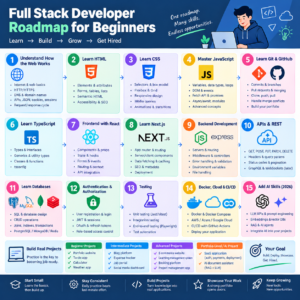
Full Stack Developer Roadmap for Beginners
If you’re completely new, follow this simplified sequence:
HTML → CSS → JavaScript → Git/GitHub → TypeScript → React → Next.js → Node.js → REST APIs → PostgreSQL → Authentication → Testing → Docker → Cloud → AI
Don’t learn React before understanding JavaScript. Similarly, don’t jump into Kubernetes or complex microservices before you understand how a basic application works.
The best full stack web development roadmap is one that gradually increases complexity.
Final Full Stack Developer Checklist
Before applying for full stack positions, you should ideally be able to:
- Build responsive websites
- Write JavaScript confidently
- Build React applications
- Create backend APIs
- Connect frontend and backend
- Design a database
- Write SQL queries
- Implement authentication
- Apply basic security practices
- Use Git and GitHub
- Write tests
- Containerize applications
- Deploy an application
- Understand basic cloud concepts
- Build at least 2–3 substantial projects
- Explain your architecture and technical decisions
- Integrate AI features into applications when appropriate
Conclusion
A full stack developer roadmap is not simply a list of programming languages and frameworks. It is a structured path that takes you from web fundamentals to building, securing, testing, and deploying complete applications.
Start with HTML, CSS and JavaScript, then progress to TypeScript and a frontend framework such as React. Move into backend development, APIs and databases before learning authentication, security, testing, Docker and cloud deployment. In 2026, adding practical AI integration skills can further expand what you can build. This progression is broadly consistent with current roadmap.sh, GeeksforGeeks, Internshala and newer 2026 roadmap resources.
Most importantly, build while you learn. A deployed application with a clean GitHub repository can demonstrate your skills far better than simply completing dozens of tutorials.
Frequently Asked Questions
1. What is the best full stack developer roadmap for beginners?
Start with HTML, CSS and JavaScript, followed by Git, TypeScript, React, backend development, databases, APIs, authentication, testing and deployment. Add AI integration after understanding the core stack.
2. How long does it take to become a full stack developer?
For a beginner, around 6–12 months is a reasonable planning range with consistent study and hands-on projects. The actual time varies according to your background and learning schedule.
3. Is React necessary for full stack development?
No. React is one popular frontend option, but Angular and Vue are also valid. Your choice should depend on your career goals and the type of companies you want to work with.
4. Should I learn MongoDB or PostgreSQL first?
For most beginners, learning SQL and a relational database such as PostgreSQL gives you a strong foundation. MongoDB can be added later when you need NoSQL concepts.
5. Is MERN still worth learning in 2026?
Yes. MERN remains a practical JavaScript-based stack, but modern developers should go beyond basic MongoDB, Express, React and Node by learning TypeScript, testing, deployment, security and AI integration where relevant. Current 2026 content continues to feature MERN while also presenting other technology paths.
6. Can I become a full stack developer without a computer science degree?
Yes, it is possible, although individual employers may have different educational requirements. A strong portfolio, practical projects, technical skills and interview preparation can help demonstrate your capabilities.
7. Do full stack developers need to learn AI?
AI is not a replacement for core web-development knowledge. However, learning to integrate AI APIs, RAG, embeddings and AI-assisted workflows can be a valuable additional skill for developers in 2026.
8. What projects should I build for a full stack portfolio?
Start with a portfolio and small applications, then build a complete application such as an e-commerce platform, SaaS dashboard, booking system or AI-powered application. Focus on functionality, deployment, security and clean code rather than the number of projects.
9. Should I learn multiple programming languages?
Not initially. Pick one primary path and become proficient. For example, you can use JavaScript/TypeScript across frontend and backend, then learn another language later if your career requires it. roadmap.sh also recommends several possible backend language paths rather than requiring one universal language.
10. What makes someone job-ready?
A job-ready developer should be able to build a complete application, connect frontend and backend, work with a database, implement authentication, use Git, test important functionality and deploy the application. A portfolio that proves these abilities is an important part of the process.